
Meet the Moment Wall: your audience's photos and videos on your AllEvents page
Sunday morning, somewhere around 10 AM. Someone who came to your event last night is on their couch, scrolling through their camera roll. The video of the chorus everyone shouted back. The photo of the friend they brought along who is now asking when the next one is. The grainy short clip of the moment the set hit its peak.
Twelve photos. One video. All of them better than anything you commissioned. None of them anywhere your future audience will ever see.
That is the gap. The night actually happened. Your AllEvents organizer page did not use to show that the night actually happened. We built somewhere for the footage to go.
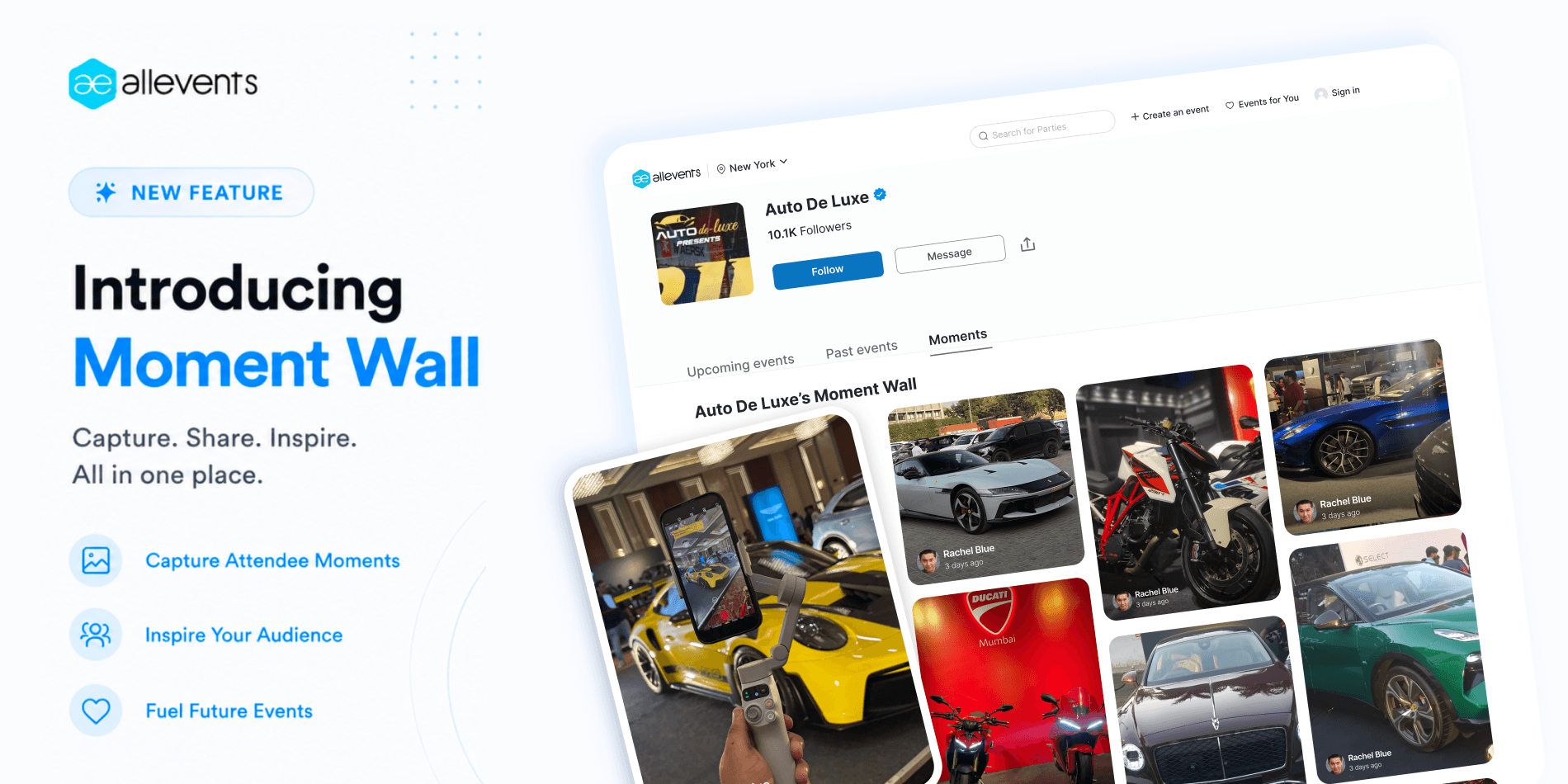
Every organizer profile on AllEvents now has a public Moment Wall, a rolling feed of photos, videos, and short reactions submitted by the people who attended your events. The wall fills up automatically because we already email every ticket buyer after the event to ask. From today, you can also generate a unique QR code and shareable link for any past event and pull moments in directly, by sharing it on stage, on your standees, in your own post-event message, or in an Instagram story. The wall is already live on your page. The QR is one click away in your dashboard.
Your audience already shot your best marketing
If you have run an event in the last year, you already know this part. The show was great. Your team is exhausted. Half of them are still at the venue helping the breakdown crew load out. The other half are home, asleep, sometime around 4 AM. And while all of that is happening, your audience is on their commute home, scrolling through everything they just shot.
By Sunday afternoon, the Instagram stories are up. The group chats have the recap pinned by Monday morning. And then it goes quiet.
Here is what should bother every event organizer. The most expensive marketing asset you will never get to commission was just shot on 400 different phones, in 400 different angles, with 400 different reactions written underneath. Your audience produced it for free, with an emotional fidelity beyond anything you could have commissioned. And right now, all of it is sitting in private camera rolls with nowhere to go.
That is what we wanted to fix.
Here is what your organizer page can look like now
The fix is a Moment Wall on your AllEvents organizer profile.
What you see on the page is a chronological grid of attendee-shot photos and short videos, interleaved with short text reactions. Every tile is tagged with the attendee’s first name and a relative timestamp (“3 days ago”, “2 weeks ago”). It scrolls. It updates. The wall keeps growing as long as your audience keeps shooting.
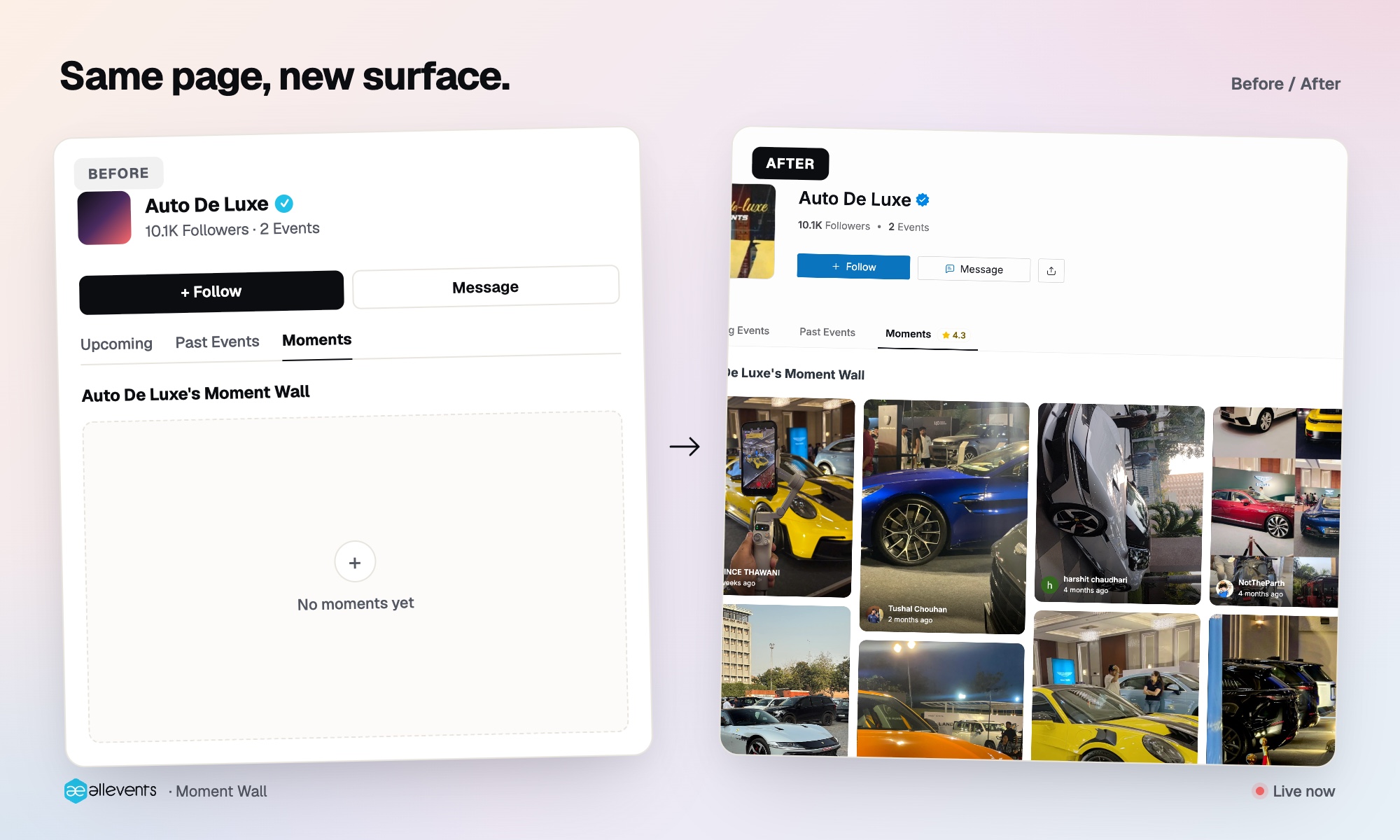
Walls like this are already running on real AllEvents organizer pages. Open any of the ones below, scroll past the upcoming events, and spend a minute in the Moments section.
- Auto De Luxe (luxury auto events)
- NYE in the ATL (upscale New Year’s Eve parties, Atlanta)
- Purses & Proverbs (craft workshops and community gatherings, New Jersey)
- Niche Artistry (paint-and-sip nights, Vancouver)
Real attendees. Real photos. The audience’s own words underneath each one. Notice what your eye does when you land on a wall like that. Notice how much faster you trust an organizer when the proof is in the audience’s own hands, not in the marketing photography the organizer chose for the cover image.
Now picture that same surface on your page. Then picture it five events from now. Then picture it eighteen events from now. The wall does not reset between events. It stacks. The page does the selling on your next event with material your audience produced for free at your last event.
How a moment gets from a phone to your wall
Three moving parts. All three run on AllEvents.
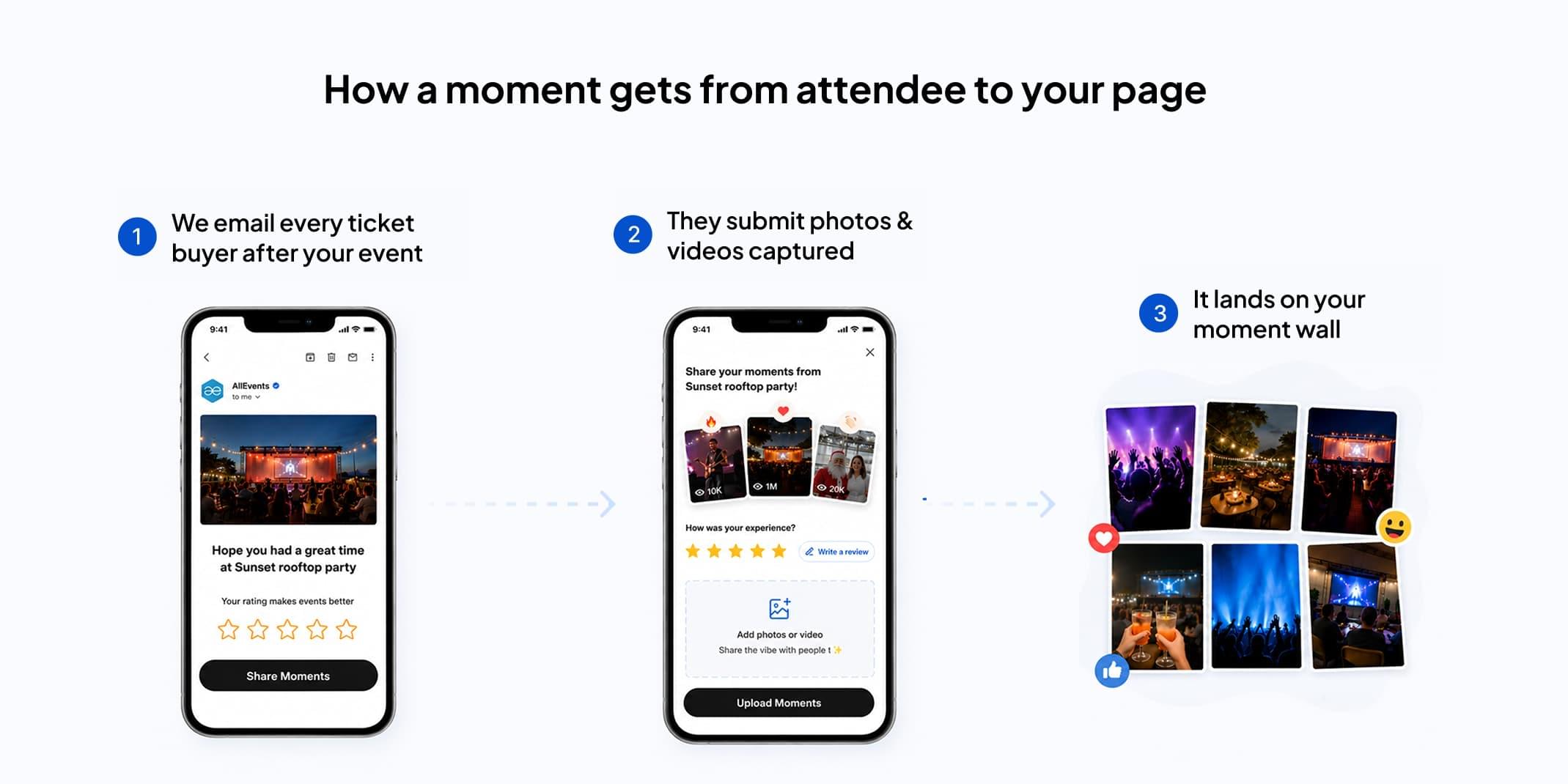
- The post-event email Within hours of your event ending, AllEvents sends every ticket buyer an email asking how the event was and inviting them to share photos, videos, and a short reaction. One tap from the email takes them to a submission screen on their phone.
- The wall on your page Approved submissions land on your organizer profile, in the chronological grid described above, with the attendee’s first name and a timestamp. Photos, short videos, and short text reactions all live on the same wall.
- The QR code and shareable link This is the new part. From your AllEvents organizer dashboard, you can now generate a unique QR code and link for any past event. Every scan or click goes to the same submission flow the email points to. You decide where the QR shows up.
Steps 1 and 2 run automatically the moment your event closes. Step 3 is the new lever you can pull as hard as you want.
The QR code, in practice
Use the QR everywhere the audience and the event are in the same place at the same time.
Announce it on stage at the closing of your event. Print it on the standees at the exit, so people walking out are already adding to the wall as they leave. Drop it in your own post-event WhatsApp blast or email to ticket buyers. Share it as an Instagram story to the same audience that just attended. Put it on the back of the flyer for your next event. Tape it to the merch table.
The proximity rule is simple. The closer the audience is to the event itself when you ask, the more moments come in. Asking on stage at 11 PM beats asking by email three days later. The QR exists so you do not have to wait for the email to do the work.
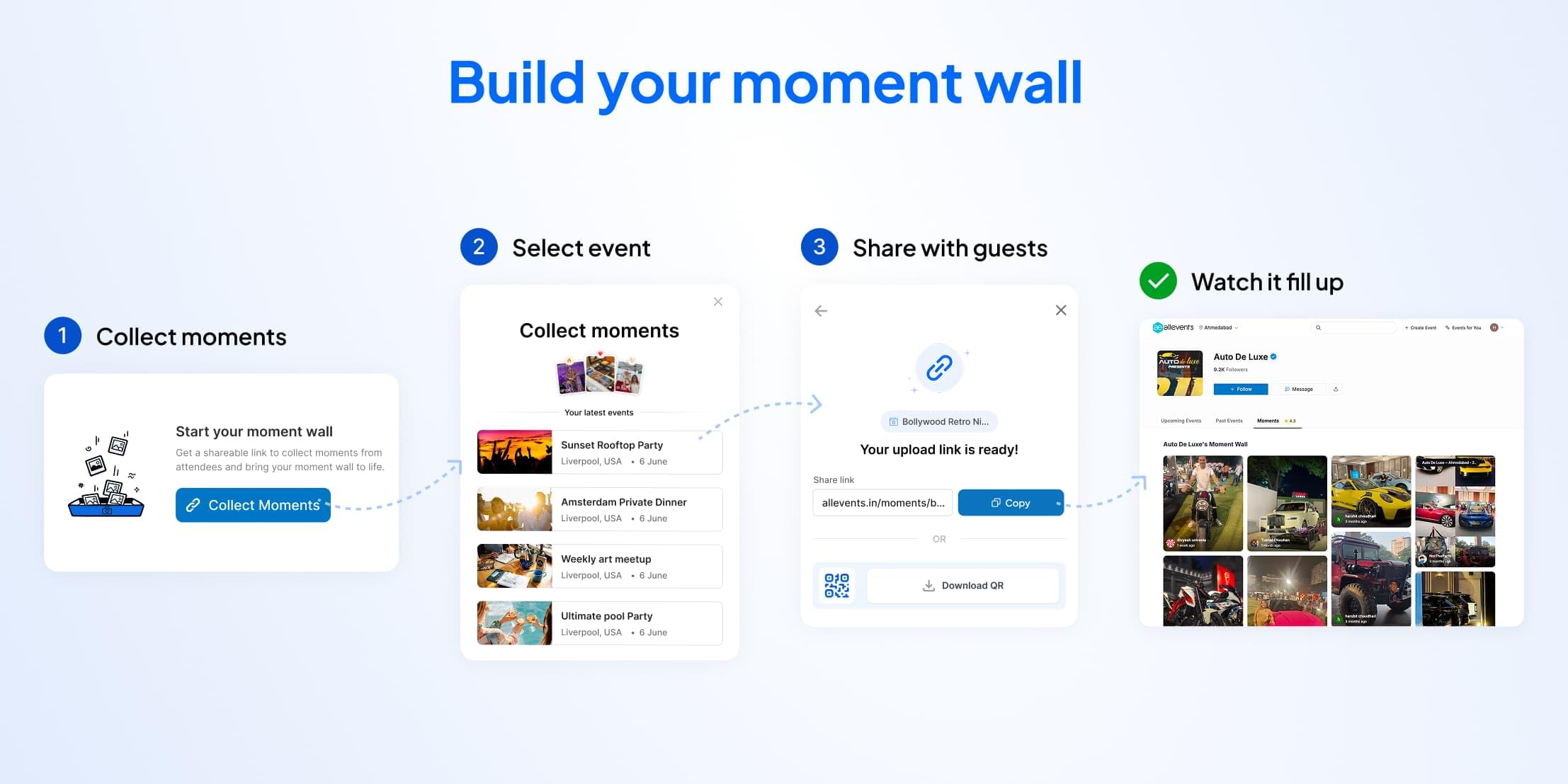
It also works on every past event, not just upcoming ones. If you have an event from six months ago whose wall could use richer content, generate the link today. Send it to the audience that was actually there. They are still your audience. The photos are still in their camera rolls.
For the attendee, it is one scan or tap, submit, done. No install, no signup, no password to remember.
Why audience-shot beats organizer-shot, every time
The most trusted content about an experience is content shot by the people who paid to be there. We already know this from food: Zomato reviews beat the restaurant’s own marketing photos every time. Travel works the same way: Google Maps photos of a hotel are more trusted than the hotel’s own website. Same with film: a Letterboxd reaction does more to make you pick a movie than the studio’s trailer.
Events are next. And, frankly, overdue.
A recap reel produced by an organizer reads like marketing because it is marketing. A wall of photos from forty different phones, each with the shooter’s name on it and a one-line reaction underneath, reads like proof because it is.
The Moment Wall lets you benefit from the social-proof economy without becoming an influencer manager. The audience is already doing the shooting. The platform now collects the work. It joins the rest of the event marketing tools on AllEvents that run in the background while you focus on the next event.
A second number organizers can point at, that keeps going up
Every public profile that matters online has a number on it that the owner has worked for and now points people to. Instagram has follower count. YouTube has subscriber count. Letterboxd has watched-films count. The number is shorthand for “this person has been at this long enough that you should pay attention.”
Your AllEvents organizer page already has one of those numbers. Your follower count sits at the top of your profile, growing with every event you run on the platform.
The Moment Wall is the second one.
Where the follower count says “this many people have signed up to hear what I do next,” the Moment Wall says “this many people, in their own photos and their own words, said the last thing I did was worth showing up to.” Often, the second number is the more persuasive of the two.
A wall of 600 audience-shot moments, accumulated over eighteen events, with names and timestamps on every tile, is something you can put in a pitch deck. It is something a sponsor can scroll. It is something an artist deciding whether to play your venue can read before they say yes. As the wall grows, you point at it the same way you point at your follower count.
The work, the post-event email, the submission flow, the moderation, the rendering on your page, runs on AllEvents. Same pattern as the way AllEvents now recovers incomplete bookings with WhatsApp reminders: the operation stays on our side, the result shows up on yours. Your job is to show up to your next event and do another one worth shooting.
The wall is already live on your AllEvents page
The QR code and shareable link are one click away in your organizer dashboard, under any past event. Open it once, share the link tonight, watch the wall fill up by tomorrow morning.
Open your organizer dashboardFrequently asked questions
What is the AllEvents Moment Wall?
The Moment Wall is a public, chronological feed of photos, videos, and short reactions on every organizer’s AllEvents profile, contributed by the people who actually attended that organizer’s events.
How do attendees submit photos and videos?
Two ways. After every event, AllEvents emails each ticket buyer a link to a one-screen submission flow. Organizers can also generate a QR code or shareable link for any past event from their AllEvents dashboard and share it with their audience directly.
Where does the Moment Wall show up on my organizer page?
On your public AllEvents organizer profile, in a Moments section that sits with your event listings. Anyone visiting your page sees it.
Do I need to turn anything on to use the Moment Wall?
No. The wall is already live on every organizer profile, and the post-event email goes out automatically after each of your events ends.
How do I generate the QR code and shareable link for my event?
Open your AllEvents organizer dashboard, find the past event you want to collect moments for, and use the share-moments option to generate the QR code and the link. Both are downloadable, shareable, and reusable across as many channels as you want.
How can I collect event photos from my attendees on AllEvents?
AllEvents collects event photos from attendees through two channels: a post-event email sent to every ticket buyer that includes a one-tap link to submit photos and a short reaction, and a QR code or shareable link the organizer can generate from the dashboard and share with the audience directly. Approved submissions appear on the organizer’s public Moment Wall.

Written by
Prateek Birla
Works on growth and organizer success at AllEvents. He helps event organizers improve their event marketing, reach more attendees, and increase ticket sales through better strategies and platform insights.
View all posts