
Track every Check- in Real time

Selling the ticket and seeing the seat filled are two very different moments.
For the longest time, your dashboard told you about the first one. You knew how many tickets were sold, but on the night of the event, you still had to guess how many buyers had actually arrived.
That space between sold and seated is where a lot of event-day stress lives. So we built Check-in Analytics for exactly that moment.
It helps organizers see who has actually entered the event, which ticket categories are arriving, which staff members are scanning, and what is happening at the gate while the event is still live.
See What Is Happening, While It Is Happening
Check-in Analytics gives organizers a clear view of what is happening at the gate while the event is live. You can see total check-ins, ticket-wise attendance, remaining guests, staff activity, and the latest attendees who entered.
No manual counting. No back-and-forth messages. No waiting until the event is over to understand attendance.
What Organizers Can Track
1. Ticket-wise check-ins
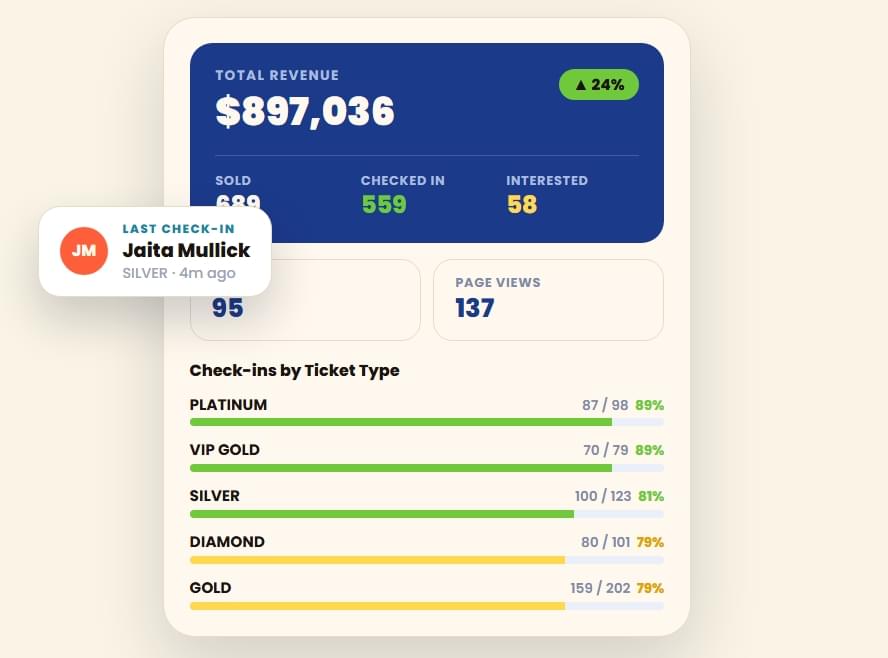
See how many Platinum, Gold, Silver, VIP, or other ticket holders have checked in and how many are still expected.
2. Staff performance
Know which staff member handled check-ins, how many tickets they scanned, and when the last check-in happened.
3. Live event stats
Track revenue, sold tickets, page views, visits, interested users, and check-in movement from one dashboard.
What This Changes for You
The most important gap is usually the one you can see at a glance. You might have sold 689 tickets and watched 559 of them turn into real people in the room. That is a story your sales figures alone could never tell you, and it is exactly the kind of number you want while the event is still running, not in a report the following week.
Knowing it early means you can hold a gate open a little longer, redirect a staff member to where the line is building, or simply reassure a client that the room is filling the way it should.
When you can see that your Platinum and VIP Gold holders are arriving at close to 90%, while a chunk of your Gold and VVIP guests are still outside, you stop treating the whole crowd as one large group. You start managing the parts that actually need your attention.
The staff breakdown does something similar for your team. It shows you who scanned what and when, so accountability does not have to be reconstructed from memory after the event.
How It Actually Works
The work happens at the gate, and your team barely has to think about it. They scan tickets the way they already do, and each scan updates the same dashboard you were using to watch sales.
- Your team scans the ticket Staff members scan tickets at the gate using the regular check-in flow.
- The dashboard updates live Each scan is recorded against the right ticket type, staff member, and attendee.
- You see the room more clearly The Check-in Analytics tab keeps count of arrivals, remaining guests, and latest entries as they happen.
Every check-in is recorded against the ticket type it belongs to, credited to the staff member who scanned it, and added to a live feed of the latest names coming through.
So, the picture in front of you stays close to the reality outside. There is no separate tool to open, no export to wait for, and no setup standing between you and the information.
Better Control at the Gate
For events with different ticket types, this becomes especially helpful. If one category is filling up faster, your team knows. If another still has many people remaining, your team can prepare for the next rush.
It gives organizers more control without adding extra work.
Use Check-in Analytics to spot slow-moving queues, late-arriving ticket categories, and staff activity while the gate is still active.
The Bigger Idea
Most platforms are happy to tell you what you sold and leave the harder question of who showed up for you to figure out on your own.
We think the second number is what actually tells you how the event is going. It should sit right next to your sales numbers, without a premium tier or an add-on standing in the way.
Check-in Analytics is part of a steady run of AllEvents features built on that same logic: the work stays on our side, and the answer shows up in your dashboard when you need it.
Frequently Asked Questions
Do I need to set up Check-in Analytics separately?
No. Check-in Analytics is already live on every event listed on AllEvents. Your team only needs to scan tickets as usual.
Can I see check-ins by ticket type?
Yes. You can track how many guests from each ticket category have checked in and how many are still expected.
Can I track staff check-in activity?
Yes. The dashboard shows which staff member scanned tickets, how many they scanned, and when the latest check-in happened.
Is this available as a paid add-on?
No. Check-in Analytics is included with events listed on AllEvents, with no extra setup or add-on required.
List Your Next Event on AllEvents
Check-in Analytics is already live on every event you list, with no setup and no add-on.
Create Your Event
Written by
Shital Bapna
Shital works in B2B marketing at AllEvents, focusing on organizer communication and product marketing. She helps create content that explains how AllEvents can simplify event planning and ticketing. In this blog, she introduces AllEvents newly launched recurring slot booking feature for organizers who host events more than once.
View all posts