Your Event Page Has an FAQ Section. Are You Using It?
You know that message. The one that hits your inbox at 11:43 PM, two days before the event.
“Hey, quick question: is there parking at the venue?”
You’ve answered it nine times this week. You answered it fourteen times for the last event. Somewhere in an alternate universe, there’s a version of you that only plans events and never types the words “free parking in Lot B” into a DM again.
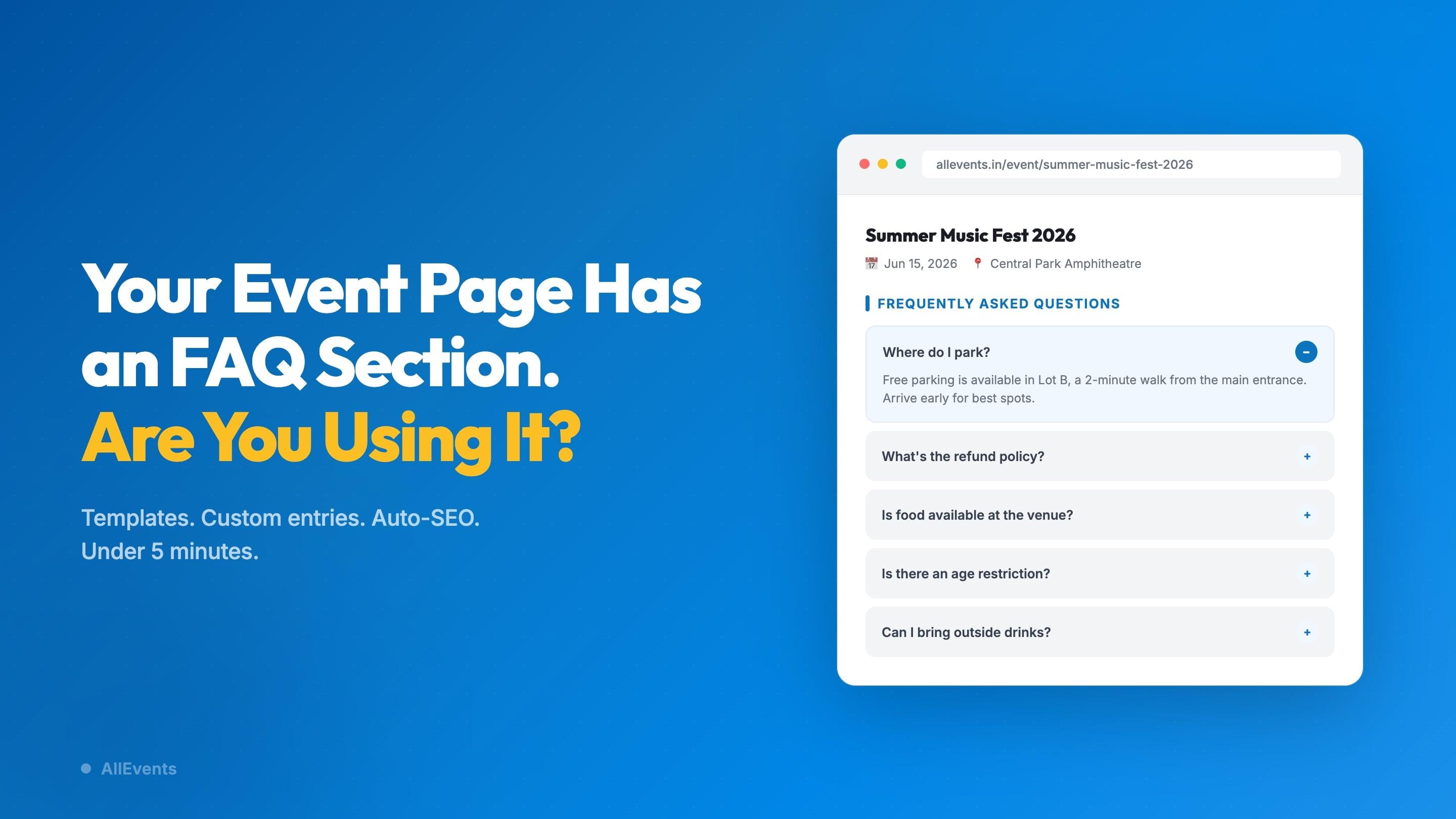
That alternate universe is closer than you think. Your AllEvents event page already has a built-in FAQ section. Pre-built templates, custom questions, automatic SEO markup. It’s sitting in your dashboard, ready to go.
The question isn’t whether the feature exists. It’s whether you’re using it. And if you are, whether you’re using it well enough to make a difference.
Because an event page FAQ section isn’t just a convenience feature. Done right, it does real work for your event.
Your AllEvents event page has a built-in FAQ section with pre-built templates, custom Q&A entries, and automatic FAQ schema for search visibility. Most organizers either haven’t set it up or aren’t using it well. This guide covers the five FAQ categories every event needs, how to set it up in under five minutes, and seven tips for writing FAQs that reduce attendee questions.
Why Does Your Event Page Need an FAQ Section?
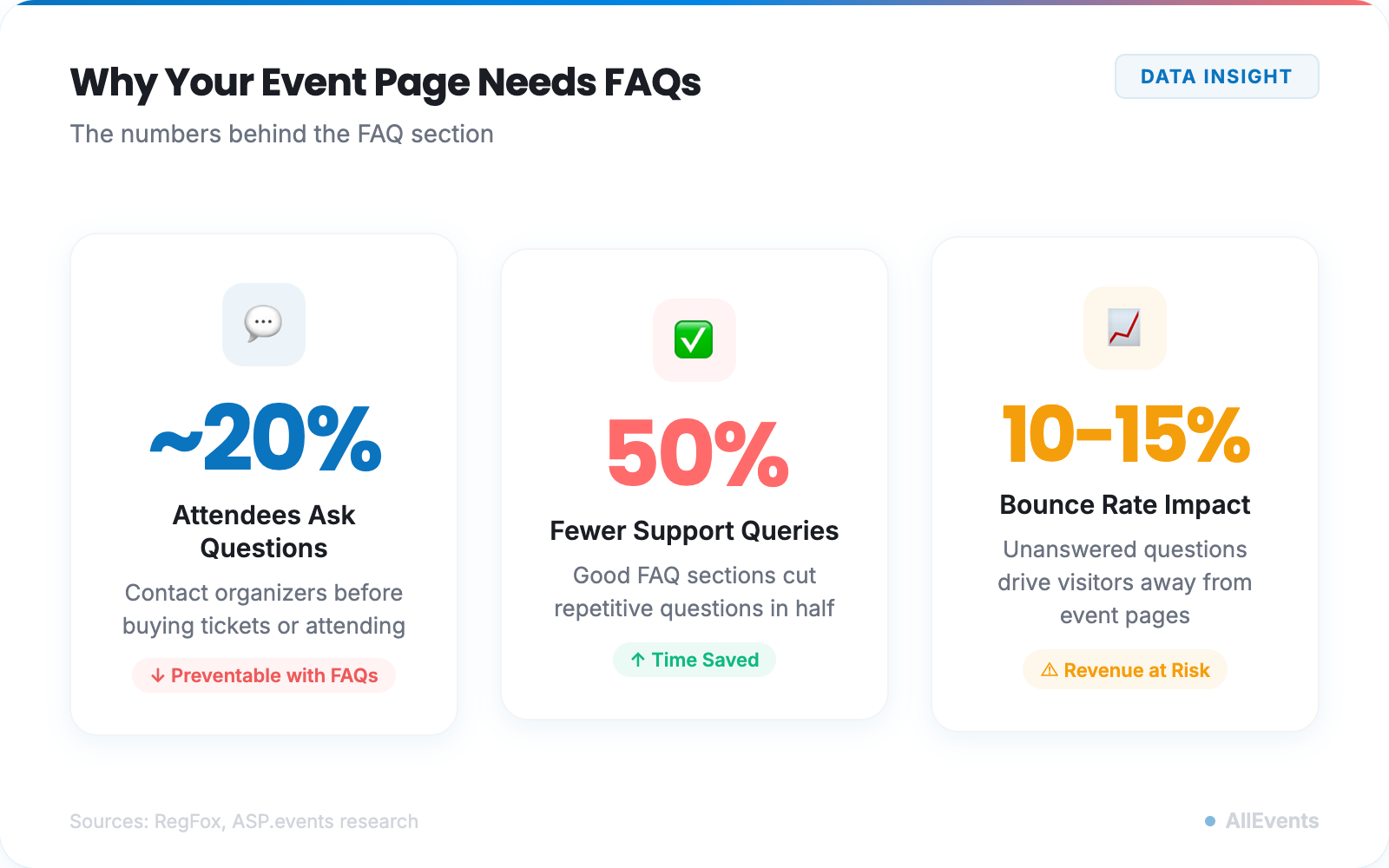
An event page FAQ section reduces attendee questions, builds trust, and improves your search visibility. About 20% of potential attendees contact organizers with questions before they commit to showing up. That’s one in five people, interested enough to consider your event but too unsure to buy a ticket without more information.
A good FAQ section can cut those queries in half.
That matters more than you think. The people who don’t reach out? They leave. They don’t email you and wait patiently for a reply. They find another event that answers their questions upfront. Or they close the tab and forget about yours entirely.
Every unanswered question on your event page is a small exit door. Parking details, refund policies, dress codes, accessibility info, age restrictions. These aren’t edge cases. They’re the exact things that sit between “interested” and “registered.”
An event page that anticipates questions feels trustworthy. Professional. Like someone who thought about the attendee experience before hitting publish. A page that doesn’t? It feels like a gamble. And people don’t spend money on gambles when there’s a safer option two tabs over.
There’s a search visibility angle too. FAQ content matches the way real people search: in questions. “Can I bring kids to [event name]?” “What’s the refund policy for [event]?” When your event page answers those queries directly, search engines (and AI tools like ChatGPT and Perplexity) are more likely to surface your page in results. AllEvents generates FAQ schema in the background when you add FAQs, so you don’t need separate event marketing tools to handle the technical side.
About 20% of potential attendees will contact you with questions before buying. A solid FAQ section cuts those queries in half, keeps unsure visitors from bouncing, and helps your event page rank for question-based searches.
The case is clear. The next question: what should your FAQ cover?
The 5 Event FAQ Categories Every Event Needs
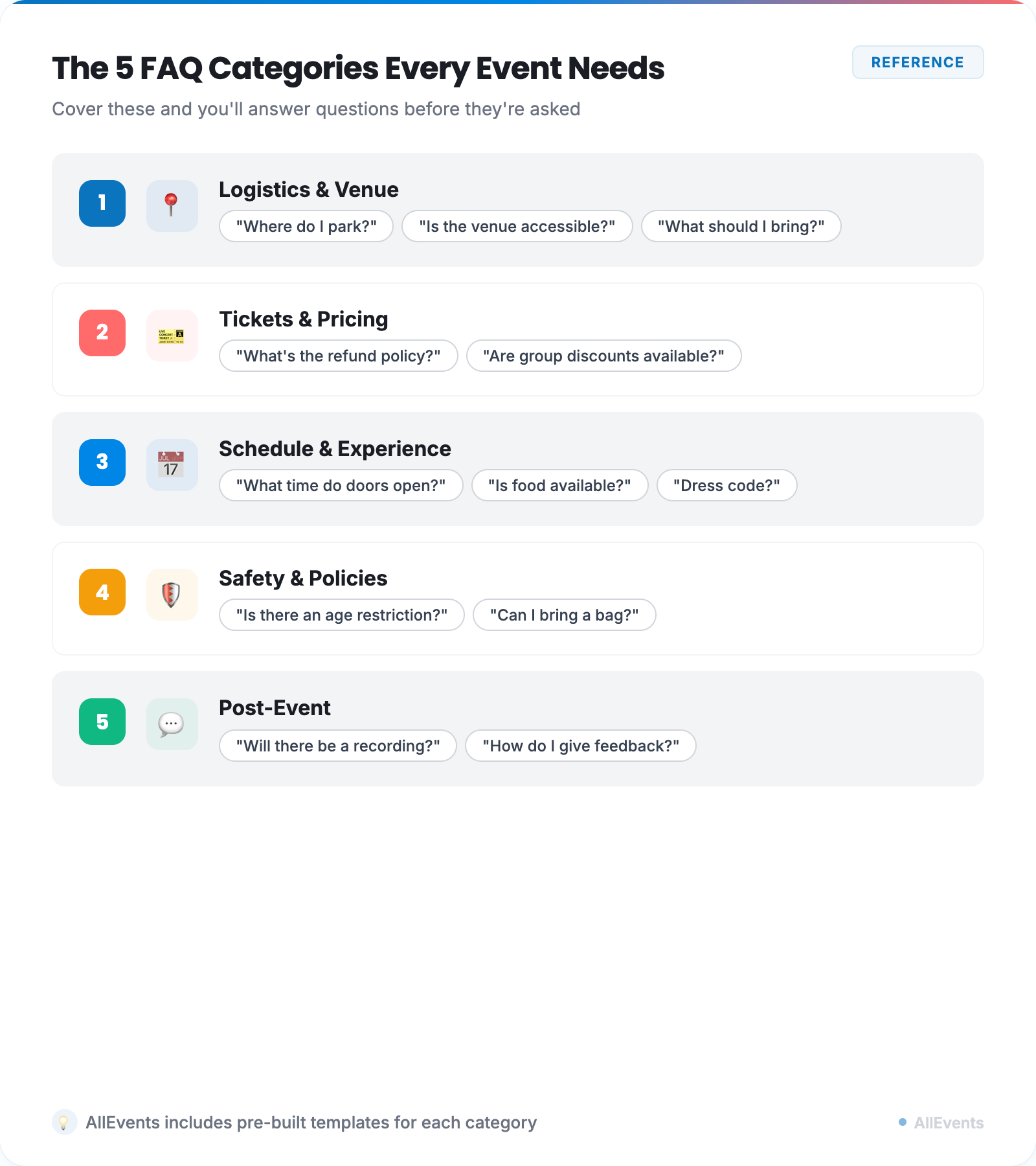
You could wing it and add whatever comes to mind. Or you could cover the five categories that consistently prevent the most common questions. (The second approach works better.)
1. Logistics & Venue
This is where most questions live. Parking, public transport options, venue accessibility, entry process, what to bring, what’s prohibited. If your event is at a venue that’s tricky to find or has unusual access rules, double down here.
Sample questions: Where do I park? Is the venue wheelchair accessible? Can I bring outside food?
2. Tickets & Pricing
Refund and cancellation policies, group discount availability, the difference between ticket tiers, transfer rules, and how to get a receipt. This category directly affects purchasing decisions. If someone doesn’t know whether they can get a refund, they’re less likely to buy in the first place. AllEvents’ event ticketing handles multiple ticket types, so your FAQ can link directly to the relevant details.
Sample questions: What’s your refund policy? Are there group discounts? Can I transfer my ticket to someone else?
3. Schedule & Experience
Start and end times (yes, people still need this spelled out), agenda or lineup details, food and drink availability, photo and video policies, and dress code. Think about what someone needs to know to prepare for your event, not just attend it.
Sample questions: What time do doors open? Is there food available at the venue? What should I wear?
4. Safety & Policies
Age restrictions, health or safety requirements, emergency contact information, and your code of conduct. If you’ve ever received a DM at 11 PM asking “Can I bring my kids?”, this is why this category exists. (Well, that parent is why. But you get it.)
Sample questions: Is there an age restriction? What’s the COVID policy? Is there a code of conduct?
5. Post-Event
Will there be a recording? How can attendees give feedback? Are there follow-up events or communities to join? This category is often overlooked, but it extends the value of your event beyond the day itself.
Sample questions: Will sessions be recorded? How do I provide feedback? Are there future events I can sign up for?
AllEvents includes pre-built templates for the most common questions across these categories. You don’t need to start with a blank page.
Knowing what to include is step one. Setting it up takes about five minutes.
How to Add FAQs to Your Event Page on AllEvents
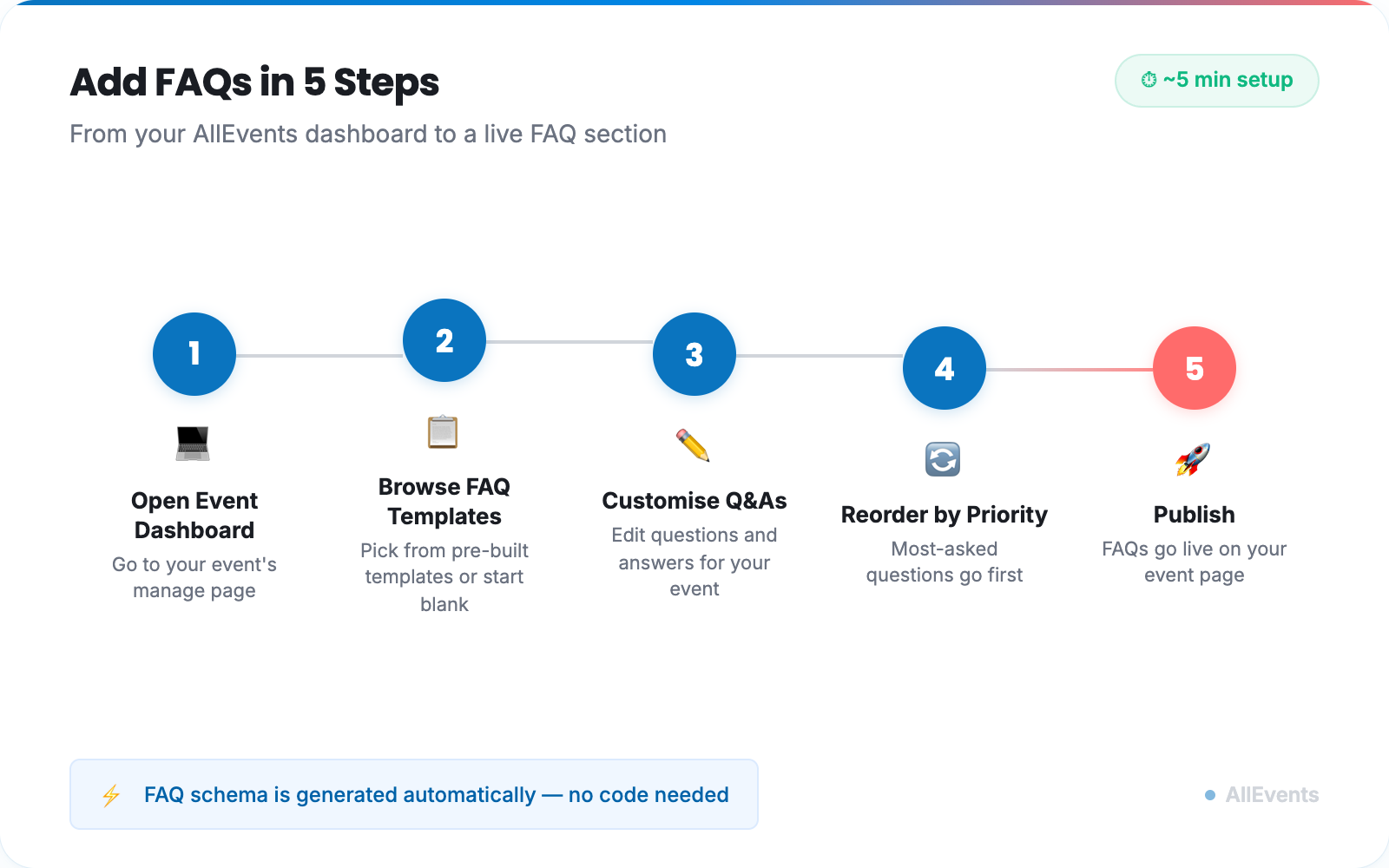
Four steps. Under five minutes. No technical skills required.
-
Create your event (or edit an existing one).
Log in, start creating your event, and fill in the basics. Click Next, and you’ll land on the Media section. Scroll to the bottom, and there it is: Frequently Asked Questions.
Already have a published event? Go to Edit Event → Media, or find it in the Next Steps section on your Event Dashboard. - Go to the FAQs section. You’ll see it under the Media tab. If you missed it during creation, your Event Dashboard has a shortcut: Next Steps → “Add FAQs for your attendees.” One click, and you’re there.
- Add your FAQs. Hit the “+” button to add a new question, or use the Quick Suggestions to pull from the most common attendee questions. Write your answer, hit save, repeat. You can mix suggested questions with your own custom ones. “Free parking in Lot B” is more helpful than “Parking is available.” Be specific.
- Complete and publish. Fill in the remaining event details, click Publish, and your FAQs go live on your event page immediately. Attendees see them right there, alongside everything else.
AllEvents automatically generates FAQ schema markup in the background. That’s the technical bit that helps search engines understand your Q&A content and potentially display it in search results. You don’t need to touch any code.
Setting it up is the easy part. Writing FAQs that prevent questions takes a bit more thought.
7 Tips for Writing Event FAQs That Actually Work
1. Write questions in the attendee’s voice.
“Where do I park?” works. “Parking information and guidelines” does not. Your FAQ should sound like a real person asking a real question, because that’s what it is.
2. Keep answers short.
Two to three sentences, max. If your answer requires a full paragraph, it probably belongs on its own page. FAQs are for quick, clear answers. Not essays.
3. Put the answer first.
“Yes, parking is free in Lot B” beats “Regarding the parking arrangements for this event, we have partnered with the venue to secure complimentary spaces in the designated Lot B area.” Directness builds trust. Hedging builds suspicion.
4. Update before every event.
Copying last year’s FAQs as a starting point is fine. Publishing them without checking if the venue changed its parking rules is not. A quick review before each event takes two minutes and prevents a lot of confusion.
5. Cover the awkward questions too.
Refund policies. Accessibility details. Age limits. These are the questions people hesitate to ask, which means they’re the questions most likely to prevent a purchase if left unanswered. If you’re uncomfortable putting your refund policy in writing, that’s a separate problem.
6. Mine your past events for questions.
Go through your old emails, DMs, and social media comments. The questions people actually asked are the ones to answer. Your inbox is the best FAQ research tool you already have.
7. Test with someone who knows nothing about your event.
Show your FAQ section to a friend who has never heard of your event. If they still have questions after reading it, your FAQ section needs more work. The people closest to the event are the worst judges of whether the information is clear enough.
How Do Event Page FAQs Help with SEO?
Event page FAQs improve search visibility by targeting the long-tail, question-based queries that attendees type into Google. When someone searches “is there parking at [venue name]” or “age limit for [event type] events,” a well-written FAQ section can put your event page in those results.
Google stopped showing FAQ rich results (those expandable Q&A dropdowns in search) for most websites back in 2023. But structured FAQ content still improves your chances of showing up in featured snippets, People Also Ask boxes, and AI-generated answers from tools like ChatGPT, Perplexity, and Google’s AI Overviews.
AllEvents handles the technical side automatically. When you add FAQs to your event page, the platform generates FAQ schema markup behind the scenes. You write the content. We handle the code.
The benefit compounds over time. An event page with a solid FAQ section ranks for more queries, attracts more clicks, and builds authority with each event you create.
Go Fill It In
Remember that 11:43 PM parking question?
Imagine this instead: the attendee visits your event page, scrolls to the FAQ section, finds the answer, and buys a ticket. No DM. No waiting. No midnight inbox notifications for you.
That’s what a five-minute FAQ setup gets you. Fewer repetitive questions. More confident attendees. Better search visibility. And a little more breathing room in your inbox the week before the event.
It’s already in your AllEvents dashboard. Pre-built templates are waiting. And your future self, the one who never has to type “free parking in Lot B” again, will thank you.
Ready to Set Up Your Event Page FAQs?
Pre-built templates, custom questions, and automatic SEO markup. Five minutes is all it takes.
Create Your Event on AllEventsFrequently Asked Questions
How do I add FAQs to my event page on AllEvents?
Log in and create your event (or edit an existing one). In the Media section, scroll to the FAQs area at the bottom. Hit “+” to add questions manually, or use Quick Suggestions to pull from common attendee questions. Write your answers, fill in the remaining event details, and publish. Your FAQs appear on the event page immediately, and AllEvents generates FAQ schema markup automatically.
What questions should I include in my event page FAQ?
Cover five core categories: Logistics and Venue (parking, accessibility, directions), Tickets and Pricing (refund policy, group discounts, ticket types), Schedule and Experience (start times, food availability, dress code), Safety and Policies (age restrictions, code of conduct), and Post-Event (recordings, feedback, future events). Start with the questions you get asked most often.
Do event page FAQs help with SEO and search visibility?
Yes. FAQ content targets long-tail, question-based searches that attendees use when they’re close to making a decision. AllEvents automatically generates FAQ schema markup when you add FAQs, which helps search engines understand your content. This improves your chances of appearing in featured snippets, People Also Ask boxes, and AI-generated search answers.
How do FAQs reduce attendee questions before an event?
About 20% of potential attendees will contact organizers with questions before buying a ticket. A well-written FAQ section answers the most common questions (parking, refund policies, age restrictions, schedules) directly on the event page, so attendees can self-serve. This can cut support queries roughly in half.
What makes a good FAQ answer for an event page?
Good FAQ answers are short (2-3 sentences), direct (lead with the answer, not the context), written in the attendee’s voice, and specific to your event. Avoid formal language. “Yes, parking is free in Lot B” is better than “Regarding our parking arrangements, we have partnered with the venue to provide complimentary parking in the designated area.”